
In this tutorial ,We will learn how to program and upload Hex code generated by Kiel or SDCC Compiler to a Nuvoton W78E052DDG (8051/8052) variant using the USB based Virtual COM port Programming Software and a USB to Serial Converter.
Here we will not be using any hardware programmer like USBASP or other custom 8051 programmer in the market .This tutorial deals with the W78E052DDG 8051 variant from Nuvoton only, other 8051 variants like AT89S51,AT89S52 cannot be programmed using the serial port.

The AT89S51/AT89S52 are programmed by using SPI based ISP programmers which can be purchased online quite easily. If you are using our 8051 development board you can use those standard programmers to upload code into your AT89S51/AT89S52 variants. Please note that our development board can be used with both W78e052DDG 8051 variant and the AT89S52 variant provided you use the programmer for AT89S51/AT89S52,all the required pins are brought out for easy access.
Contents
- What is Nuvoton W78E052DDG Microcontroller
- Datasheet of Nuvoton W78E052DDG
- W78E052DDG (8051) ISP Hardware Programming Circuit
- Installing the Nuvoton 8051 ICP-ISP Programmer Software
- Creating HEX files for 8051 Microcontroller
- Uploading HEX files to W78E052DDG (8052) using COM Port
What is Nuvoton W78E052DDG (8051/8052) variant
The Nuvoton W78E052DDG is an 8-bit microcontroller based on the MCS-51 (8051) architecture, often described as an 8052-class variant due to its enhanced features. It is fully compatible with the standard 8051/8052 instruction set, allowing legacy 8051/8052 code to run without modification.
The device integrates 8 KB of on-chip Flash, 256 bytes of RAM, four 8-bit I/O ports, three 16-bit timers/counters, a full-duplex UART, watchdog timer, and supports in-system programming (ISP).

It is widely used as a pin and code compatible alternative to parts like the AT89S52, with added benefits such as higher clock options and modern Flash memory.
Datasheet of Nuvoton W78E052DDG
8051 ISP Hardware Programming Circuit
Now here we will explain the circuit for programming and uploading hex code to the Nuvoton 8051 variant W78E052DDG using your PC's virtual COM port.
The W78E052DDG have the ability to upload code using its UART similar to the earlier P89V51 microcontroller from NXP. The Nuvoton provides a software called Nuvoton 8051 ISP-ISP Programmer that runs on Windows 11 OS to upload and update the firmware on your 8051 microcontroller. The software resets the microcontroller and put it in boot mode and uploads code using the PC's Virtual COM port.

For using the programming software you will need a USB to Serial Converter that exposes TXD ,RXD and GND pins for connecting the 8051 Microcontroller with your Windows PC as shown in the below block diagram.
Nuvoton 8051 ISP-ISP Programmer has the ability to RESET your Microcontroller by toggling controls pins of the USB serial port .In our case we will not be using that feature and the user will have to reset the 8051 microntroller manually while uploading code.
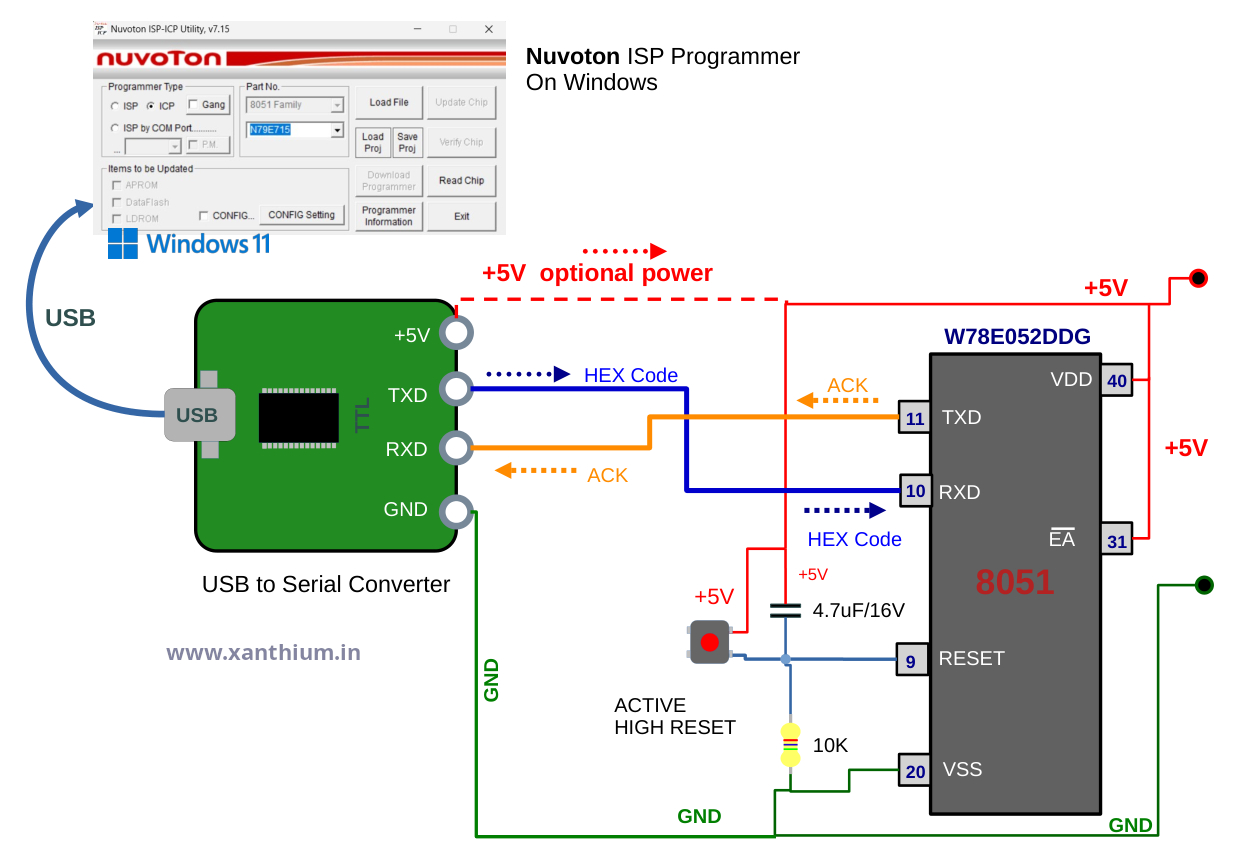
Here the TXD line from the USB to Serial Converter is connected to the RXD line of 8051 microcontroller so the data send by the PC side software is received by the W78E052DDG microcontroller.
RXD line from the USB to Serial Converter is connected to the TXD line of 8051 microcontroller so the data coming from the 8051 microcontroller (W78E052DDG) can be read by the PC side software.
Make sure that the Ground Lines of the USB to Serial Converter and the 8051 microcontroller are connected.
8051 uses an ACTIVE HIGH RESET signal so make sure that RESET circuit looks like in the below circuit
/EA /VPP line should be pulled HIGH to +5V
Remember to RESET the 8051 when the Nuvoton 8051 ICP-ISP Programmer starts the upload process.
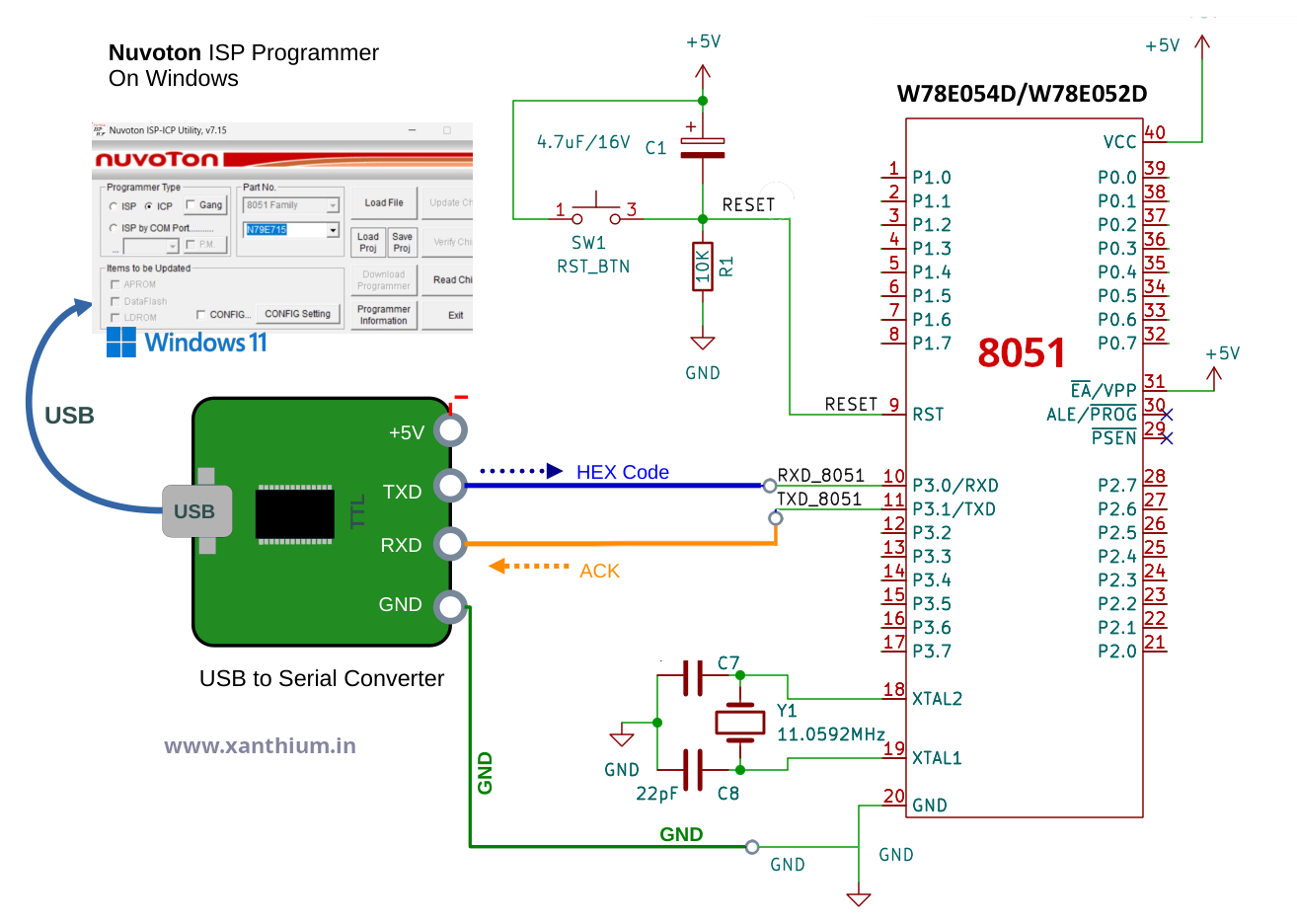
You can use the circuit shown above and wire up a 8051 programmer on a bread board or you can buy our 8051 Development Board with ADC and 7 Segment Display for downloading the code and learning about 8051 architecture.
You can also check out our USB to Serial/RS232/RS485 converter Module for uploading 8051 code, connecting your 8051 with PC using RS232 protocol or communicating to RS485 based industrial devices from your PC or your 8051 microcontroller.
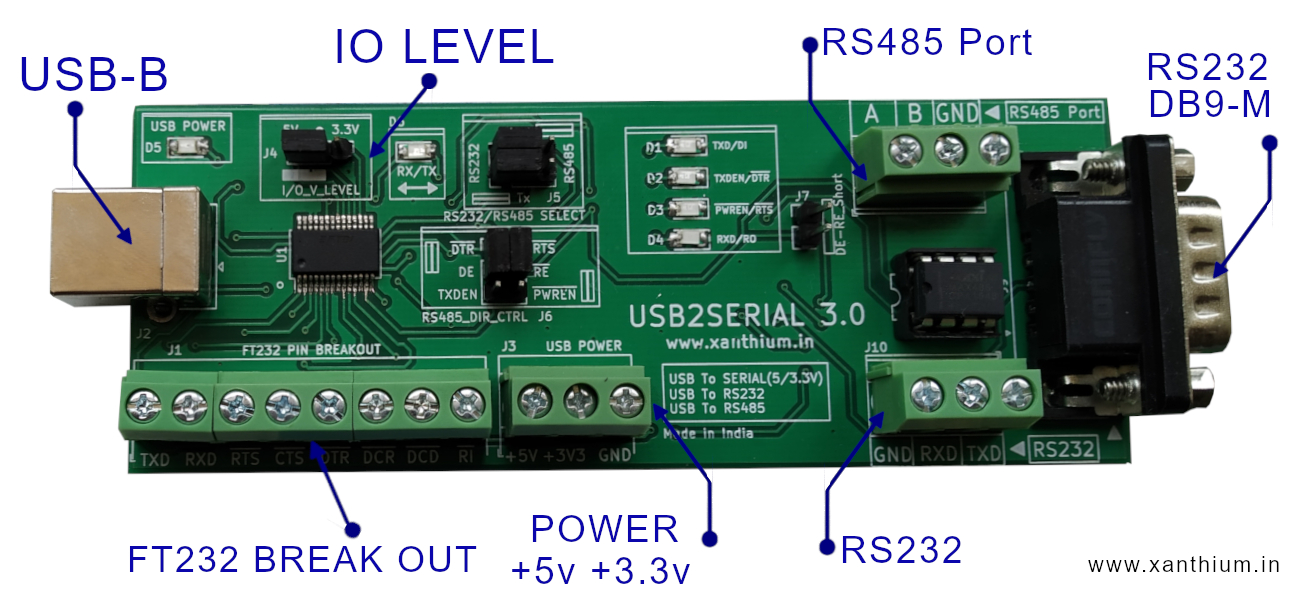
You can use our USB2SERIAL Converter to power your Microcontroller directly with +5V during programming.
Installing the 8051 ISP Programmer Software
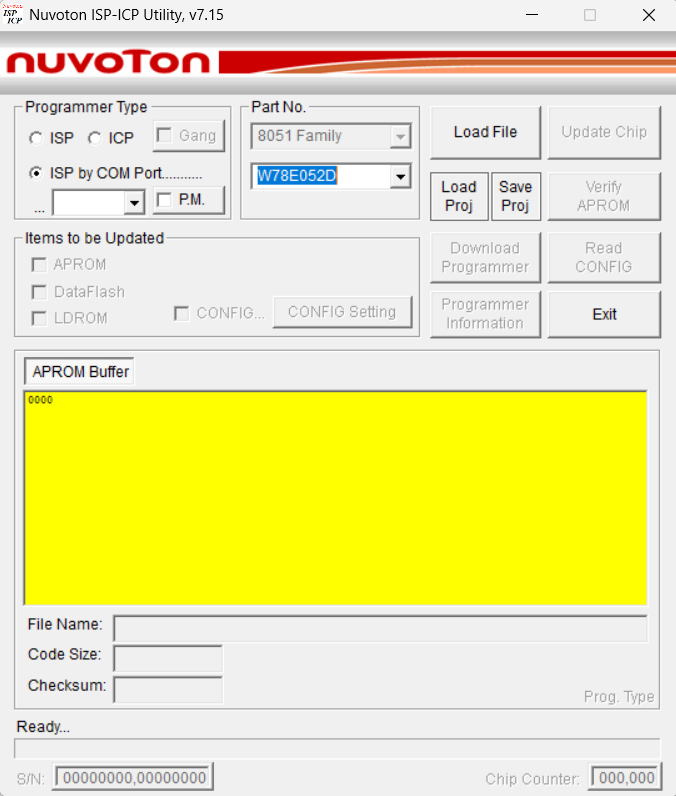
Now we are going to download and install the Nuvoton 8051 ICP-ISP Programmer on our Windows 11 Computer for flashing firmware to our 8051 microcontroller (W78E052DDG ).
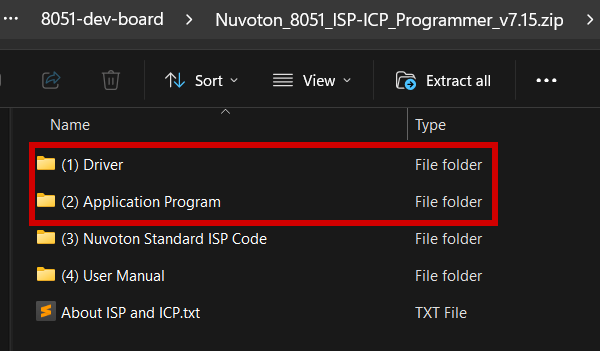
You can download the Nuvoton 8051 ICP-ISP Programmer Software from here. Second entry in the below image, highlighted by red rectangle.

Now extract the executable from the ZIP file and install it on your Windows Computer Windows 10 or Windows 11). Zip file comes with the driver and the Application software.
Once the software is installed on your Windows PC, You can run it.
Creating HEX files for 8051 Microcontroller
The Programming software expects a hex file to be uploaded into the 8051 microcontroller. You will have to compile your source files (C,ASM or Basic ) into an Intel Hex Format.
Most modern Embedded Development IDE's like Kiel or SDCC or IAR can do that automatically.
You can find links to 8051 embedded software development using Kiel uvision and SDCC below.
8051/8052 Embedded Software Development Tutorial using Keil uVision IDE
8051/8052 Embedded Software Development Tutorial using SDCC (Small Device C compiler)
Uploading HEX files to 8052 using COM Port
Once the HEX file is created you can upload it to the 8051 using Nuvoton 8051 ICP-ISP Programmer.
First connect the USB to Serial Converter to your PC and find out the number of the COM port from Device Manager.
Nuvoton 8051 ICP-ISP Programmer will also auto detect the available COM Ports and can be accessed from the drop down menu below ISP by COM Port.
If you are unable to detect any virtual COM Ports (serial port ),Make sure that correct drivers are installed. if you are using USB2SERIAL from our Website make sure that FTDI VCP drivers for FT232 are installed on your Windows 11 computer.
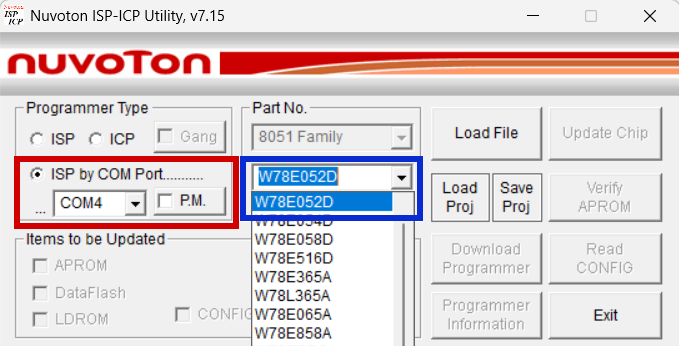
Select ISP by COM Port ,Select the COM Port number from the drop down menu and then select the Part No (part number) you want to upload the hex file to.
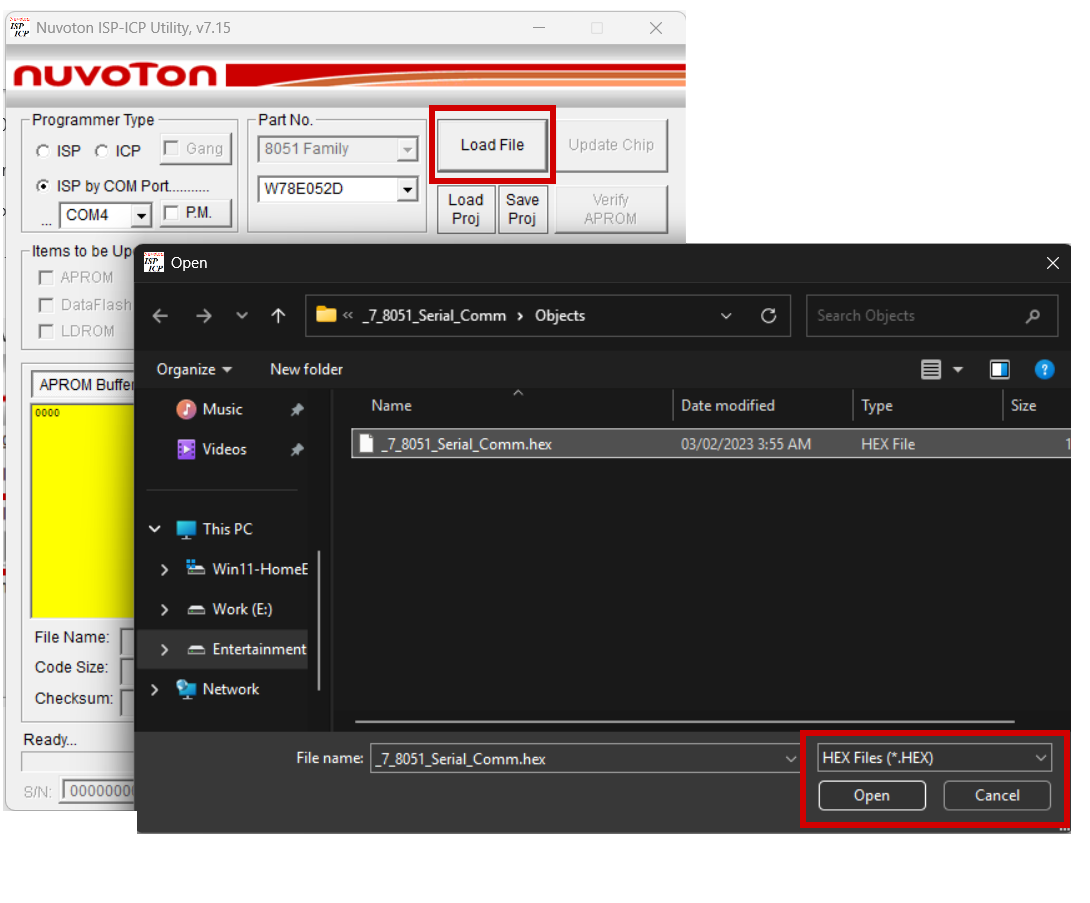
Now use the Load File Button to select the Hex file you want to upload.
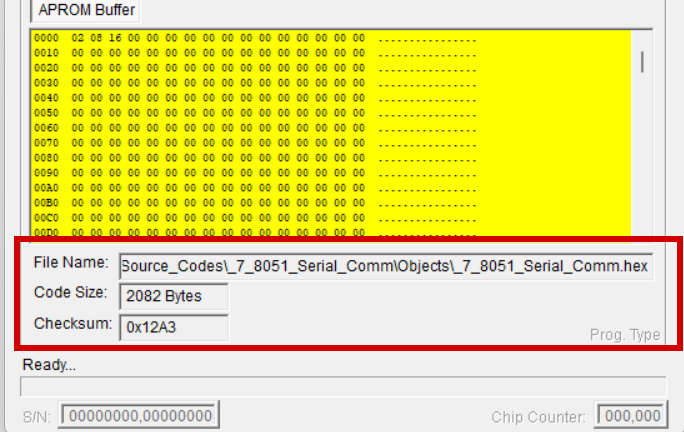
Now the details of the selected file can be seen on the bottom part of the program
Now you can press the Update Chip Button to download the code into the Chip.
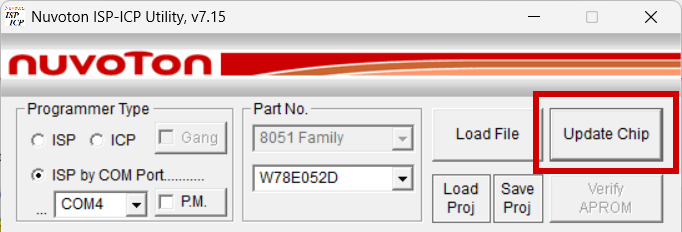
After Pressing the Update Chip button you will have to to RESET the 8051 (W78E052D) chip on the board within a few seconds .
The Nuvoton Software will prompt you a shown in the below figure.
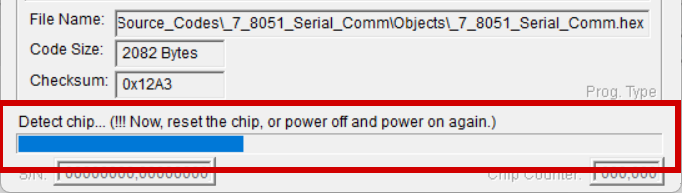
If you don't RESET the chip within the specified time, the hex file upload will fail.
After RESETing the chip

and finally
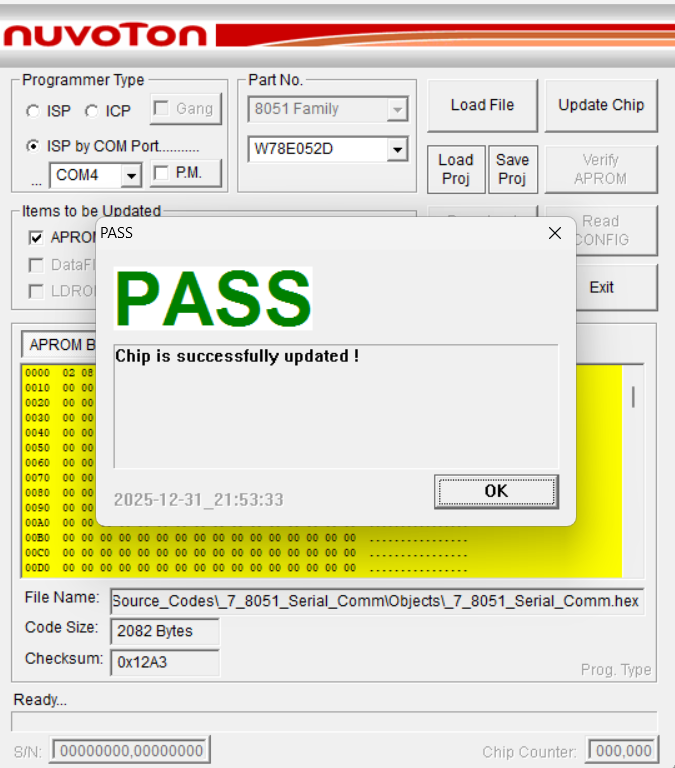
Now the code is uploaded into your 8051 microcontroller and the code will start running now.
8051 Development Board with ADC and 7 Segment Display
Tags
- Log in to post comments