
In this Tutorial ,we will learn how to configure, compile and generate hex file using Small Device C compiler (SDCC) for the 8051 architecture.
Small Device C Compiler (SDCC) is a free opensource (GPL) C compiler for 8051 based microcontrollers .It consists of linker, assembler, simulator and debugger for developing software for the 8051 architecture.
SDCC is completely free and there is no restriction on code size.
If you are looking for Keil IDE for 8051 Software development and Programming, Check this tutorial
Contents
- Downloading SDCC
- Compiling C file using SDCC
- Setting 8051 Interrupts in SDCC
- Generating HEX file using SDCC
Downloading Small Device C compiler (SDCC)
Small Device C compiler can be easily downloaded from its Sourceforge page ,No registration is required compared to Keil.
The compiler is cross platform and is available for Windows, Linux and Mac OSX platforms. Here we will be mainly dealing with the Windows Platform .
Compiling C file using SDCC for 8051 architecture
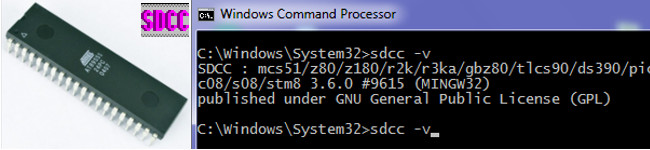
After installing SDCC ,you can type on the windows prompt sdcc -v to check its version.
Now create a folder called LedBlink to store your C files.
Now copy the below C code and save it in the LedBlink folder as LedBlink.c
8051 Code (LedBlink.c)
#include <8052.h>
void delay(void);
void main(void)
{
   while(1)
   {
        P1 = 0xFF; // Turn ON all LED's connected to Port1
        delay();
        P1 = 0x00; // Turn OFF all LED's connected to Port1
        delay();
   }
}
void delay(void)
{
   int i,j;
   for(i=0;i<0xff;i++)
        for(j=0;j<0xff;j++);
}
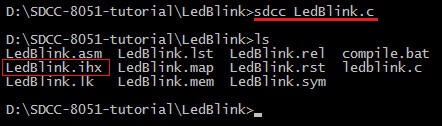
Open cmd.exe and navigate to LedBlink Folder. Type the following command to compile the C file.
sdcc LedBlink.cIf there are no errors ,the code will compile and generate several files as shown in the below image.
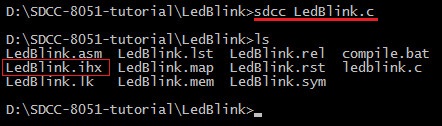
Here the LedBlink.ihx is the hex file created by SDCC .
Setting 8051 Interrupts in SDCC
In SDCC (Small Device C Compiler), the syntax is very similar to Keil, but there are a few subtle differences in how the keyword is written and how the compiler handles the code generation.
While Keil uses interrupt 1, SDCC uses __interrupt (1).
The standard template for an ISR in SDCC is.
void Function_Name(void) __interrupt (Interrupt_Number) //(double undersquares are used)
{
   // ISR Code
}
The 8051 microcontroller has 5 major interrupt sources (plus a special Reset signal). These interrupts allow the CPU to respond immediately to internal or external events rather than constantly checking (polling) for them.
The major interrupts of 8051 are.
- External Interrupt 0 (INT0), Location 0003H,Triggered via External Pin P3.2
- External Interrupt 1 (INT1), Location 0013H,Triggered via Pin P3.3
- Timer 0 (TF0) Internal Interrupt, Location 000BH,Triggered when Timer 0 overflows
- Timer 1 (TF1),Internal Interrupt, Location 001BH,Triggered when Timer 1 overflows.
- Serial Port (RI/TI),Internal Interrupt, Location 0023H,Triggered on completion of data transmission (TI) or reception (RI).
Interrupt Source | SDCC Interrupt Number | Vector Address |
External Interrupt 0 (INT0) | __interrupt (0) | 0x0003 |
Timer 0 (TF0) 1 | __interrupt (1) | 0x000B |
External Interrupt 1 (INT1) | __interrupt (2) | 0x0013 |
Timer 1 (TF1) | __interrupt (3) | 0x001B |
Serial Port (RI or TI) | __interrupt (4) | 0x0023 |
Timer 2 (8052 specific) | __interrupt (5) | 0x002B |
Here is an example of setting up a 8051 External Interrupt 0 (INT0) in SDCC .
#include <8051.h>

void main(void)
{
   //Config code

}

// External Interrupt 0 ISR
void external0_isr(void) __interrupt (0)
{
   //ISR code here
}
Converting ihx format to Hex Format using SDCC
Now most of the hex file downloaders will not recognize the .ihx format.
To convert the ihx format to hex format you have to use another program called packihx which will repackage ihx to hex format.
Now type the following commands to create the hex file .
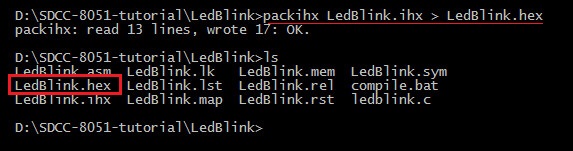
packihx LedBlink.ihx > LedBlink.hex
After running this command you can see the new hex file (LedBlink.hex) inside your folder .Which you can then download into your 8051 microcontroller.
Downloading Hex file to 8051
After you have generated your hex code using SDCC ,You can upload the code into your 8051 derivative. Uploading hex code is specific to the 8051 derivative you are using.
Tags
- Log in to post comments