
In this tutorial, We will learn to create and connect with a SQLite3 Database using Java and perform CRUD operations on it.
here we will use the JDBC api
Contents
- Source Codes
- What is JDBC
- What is a SQLite Database
- JDBC Classes & Methods for Database Programming
- DriverManager Class
- getConnection() Method
- setLoginTimeout() Method
- Connection object
- DriverManager Class
- Downloading the SQLite Java Connector
- Creating and Connecting to SQLite Database
Source Codes

Here we are using free and opensource software called DB Browser for SQLite to Visualize the SQLite Database.
What is JDBC in Java?
JDBC (Java Database Connectivity) is a standard Java API that enables Java applications to interact with relational databases in a structured and consistent way.
It provides a set of interfaces and classes, mainly from the java.sql and javax.sql packages, that allow developers to establish database connections, execute SQL queries, retrieve and process results, and manage transactions.
Using JDBC, a Java program can communicate with different types of databases such as MySQL, Oracle, SQlite or PostgreSQL through database-specific drivers, most commonly Type 4 (thin) drivers that are written entirely in Java.
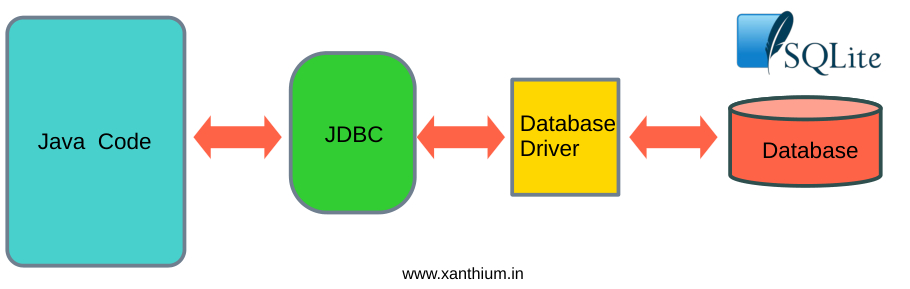
Database drivers translate standard JDBC method calls into database-specific commands and protocols that the target database can understand. They act as a bridge between the Java application and the database server, handling tasks such as establishing connections, sending SQL statements, receiving results, and managing data type conversions.
Each database system, such as MySQL, Oracle, or PostgreSQL, provides its own driver because the internal communication protocol differs from one database to another. Without a database driver, a Java program cannot connect to or interact with a database.
In modern applications, Type 4 (thin) drivers are most commonly used because they are written entirely in Java, platform-independent, and do not require additional native libraries.
What is a SQLite Database

SQLite is a lightweight, open-source, embedded relational database management system that stores the entire database in a single file on disk. Unlike database systems such as MySQL or Oracle, SQLite does not require a separate server process; it runs directly inside the application that uses it. This makes it fast, simple to set up, and ideal for small to medium-sized applications, mobile apps, desktop software, and embedded systems. It is widely used in mobile platforms like Android and in browsers and other applications where a lightweight database solution is required.
JDBC Classes & Methods for Database Programming
Here we will learn about the important JDBC classes, methods, properties and interfaces needed for programming the SQLite3 Database using Java language.
Most of the classes and interfaces discussed are in the
java.sql.*   //package
javax.sql.* //package
DriverManager Class
In Java JDBC, DriverManager is a core class used to manage database drivers and establish connections to databases. It is found in java.sql.DriverManager.
Main methods we need to be familiar with in DriverManager are
getConnection()
setLoginTimeout()
getConnection() Method
DriverManager.getConnection() is a static method used to establish a connection to a database.
It returns a Connection object (java.sql.Connection) if successful or throws SQLException if the connection fails.
Basic Syntax for establishing the connection to a SQLite, MySQL, MariaDB database is
//example url = "jdbc:mysql://localhost:3306/your_database_name";
//username    = "rahul"
//pasword     = "G7m!rP2zQ#xL"

Connection con = DriverManager.getConnection(url, username, password);
In JDBC, the url (or database URL) is a string that tells the JDBC driver how to connect to your database. It contains information like
- Protocol name (jdbc)
- Database type (driver)
- Hostname or file location
- Port number (for network databases)
- Database name
the colon (:) is used as a separator to distinguish different parts of the URL.
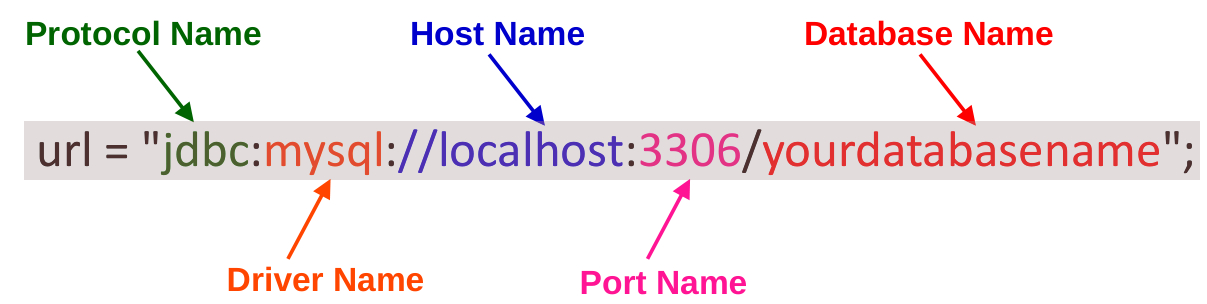
For file based database like SQLite ,The connection string would look like.
String url = "jdbc:sqlite:your_sqlite_database_name.db";
setLoginTimeout()
DriverManager.setLoginTimeout(int seconds)setLoginTimeout() Sets the maximum time (in seconds) that DriverManager.getConnection() will wait while trying to establish a connection to the database.
If the connection cannot be established within this time, it throws a SQLTimeoutException.
By default the value is zero , that means that it will wait indefinitely.
DriverManager.setLoginTimeout(10); // wait max 10 seconds
Connection conn = DriverManager.getConnection(url, username, password);
This Applies only to connection attempts (getConnection()) and Does not apply to query execution; for that, you use Statement.setQueryTimeout().
Some JDBC drivers may ignore it, but most network drivers (MySQL, PostgreSQL, MariaDB) respect it.
Ignored for SQLite, since it’s file-based and local.
Connection object
Downloading the SQLite Java Connector
You can download the jar file for the SQLite Java JDBC driver from the Projects GitHub Page
Creating and Connecting to SQLite Database
Here we will create an SQLite database and open a connection to the newly created database using Java.
Please create a file called JavaSqliteDbConnect.java
Make sure that the SQLite Java JDBC driver (sqlite-jdbc-3.51.2.0.jar) is in the same directory as the Source code.
// JavaSqliteDbConnect.java
// Java Code to Create and Connect to a SQLite Database on Disk
// (c) 2026 www.xanthium.in

// Make sure that SQLite JDBC Driver (.jar) is in the same directory as the .java file

// Compile first
// javac JavaSqliteDbConnect.java

// Run the code after compiling
// java -classpath ".;sqlite-jdbc-3.51.2.0.jar" JavaSqliteDbConnect   # in Windows
// java -classpath ".:sqlite-jdbc-3.51.2.0.jar" JavaSqliteDbConnect   # in macOS or Linux

// For No Warnings
// java --enable-native-access=ALL-UNNAMED -classpath ".;sqlite-jdbc-3.51.2.0.jar" JavaSqliteDbConnect

import java.sql.*;
public class JavaSqliteDbConnect
{
    public static void main(String[] args)
    {
        String SqliteDbUrl = "jdbc:sqlite:TestDatabase.db";
        try(Connection sqlite_conn = DriverManager.getConnection(SqliteDbUrl))
        {
            System.out.println("Connected to SQLite database!");
        }
        catch (Exception e)
        {
           System.out.println(e.getMessage());
       }
    }
}
Compile the above file
javac JavaSqliteDbConnect.javaAnd you can run the resulting class file using the below commands.
java -classpath ".;sqlite-jdbc-3.51.2.0.jar" JavaSqliteDbConnect # in WindowsIf you are on Linux or macOS
java -classpath ".:sqlite-jdbc-3.51.2.0.jar" JavaSqliteDbConnect # in macOS or Linux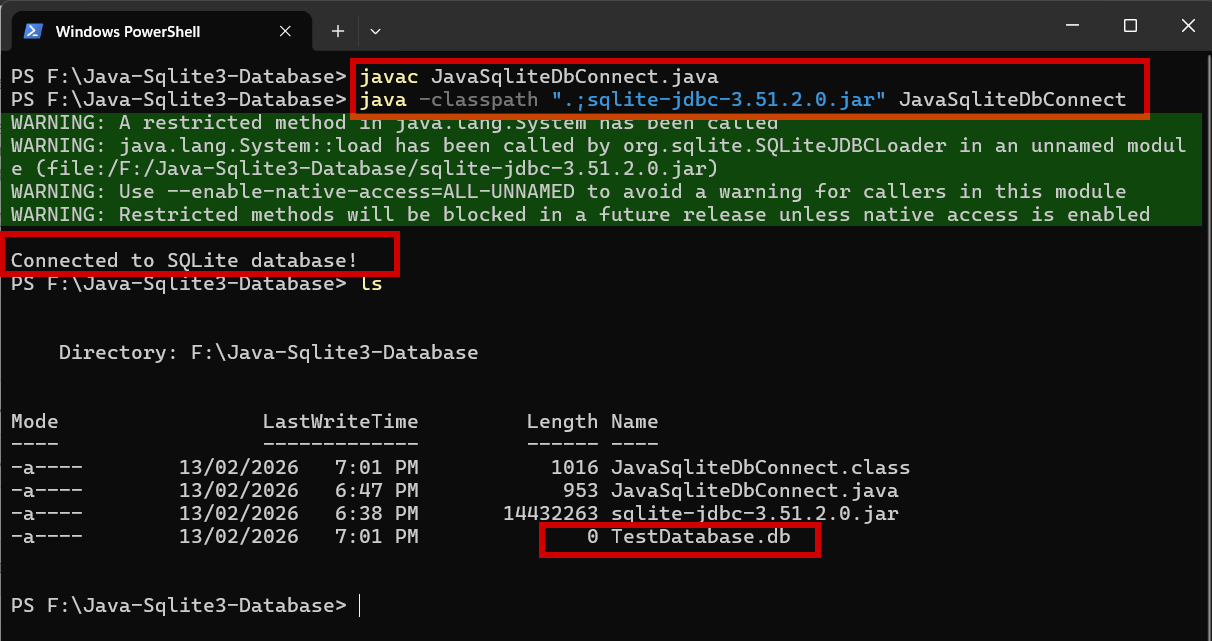
After running this you can find a new database created inside your file directory called TestDatabase.db.
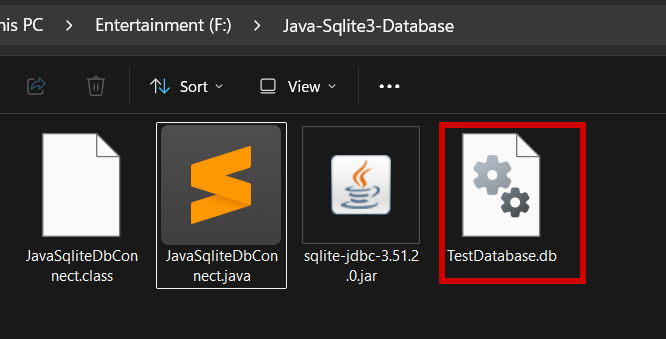
You can see the running of our program resulted in lot of warning messages. you can stop this by explicitly allowing native access in the jvm.
java --enable-native-access=ALL-UNNAMED -classpath ".;sqlite-jdbc-3.51.2.0.jar" JavaSqliteDbConnect
- Log in to post comments